
AI is starting to play a more visible role in legal workflows, but how it is used and whether it can be trusted still vary widely across teams. AI can be used within legal teams to help with everything from contracts to case files, disclosures, internal records and supporting evidence.
At the same time, expectations have shifted. Clients want a faster turnaround and more visibility into how decisions are made. For internal teams, legal is expected to move at the same pace as the rest of the business.
As a result, AI is being explored as a way to manage the increased workload and expectations happening in legal. While it won’t replace human-in-the-loop judgement, AI can help legal teams reduce the time spent working through large volumes of material so attention can be focused on the outcomes of any legal proceedings.
Which types of AI are available for legal teams?
Legal teams now have access to a range of AI tools designed to support different parts of legal work, from quick drafting through to large-scale document analysis. These fall into a few core categories.
Conversational AI and large language models (LLMs)
Conversational AI tools like ChatGPT and similar models are often the first point of entry for most legal teams. These tools can besed for summarising documents, drafting clauses, rewriting text and answering questions based on provided material. While they are quick to use and widely accessible, they do require careful consideration and oversight, both in terms of accuracy and where sensitive data is being processed.
AI agents for legal workflows
AI agents support legal teams to carry out tasks and activity that occurs across multiple steps, rather than responding to a single prompt. In legal workflows, this can include reviewing sets of documents, checking for specific clauses or inconsistencies, comparing information across a range of sources and updating datasets based on what is found.
AI agents can be particularly useful for repetitive or structured work that would normally require multiple manual passes and can operate with less input, once set up. While it still requires a level of human-in-the-loop manual oversight to confirm outputs and ensure accuracy, it can save a lot of time and effort on the part of legal teams.
Native AI platforms built for legal work
There are now several AI platforms designed to support legal use cases, with features built around contracts, case law and document-heavy workflows. These tools offer structured analysis and operate within controlled environments suited to handling sensitive material.
Beings is built to support this type of work, allowing legal teams to analyse large volumes of documents and client material in one place. It enables teams to review, compare and interrogate information while keeping outputs grounded in source material with direct citations and in-built audit trails.
This makes it particularly well-suited to high-volume or complex matters, where maintaining context across multiple files is essential.
What are legal teams using AI for?
Currently, legal teams are using AI across a large range of day-to-day tasks, particularly where there are large volumes of data and material to cover. The focus is less about replacing legal judgment, and more about the ability to process everything faster, allowing teams to spend their billable hours on essential tasks and client communications.
The main ways that AI can be used within legal are:
1. Reviewing long or complex documents faster
AI helps legal teams to speed up first-pass reviews, particularly for contracts and case files. Key clauses, risks and overarching themes can be surfaced early, allowing legal teams to focus their attention more quickly.
2. Analysing large document sets across a case or matter
Legal work often involves multiple sources of information, where the challenge is connecting everything rather than simply reading it. AI can help surface links, patterns and inconsistencies across documents, reducing the need to revisit material when there is already information overload.
This is particularly useful when working across witness statements, transcripts or disclosure material, where key details or contradictions may be spread across multiple sources.
3. Finding discrepancies in contracts
AI can help pick up issues that are easy to miss during manual review, especially when working at speed. This includes missing clauses, conflicting terms, broken cross-references and inconsistencies in definitions and formatting.
One area where it is particularly useful is when reviewing external drafts or variations of standard agreements, when differences in wording can introduce subtle shifts and risks that may not be immediately apparent.
4. Transcribing legal conversations and proceedings
AI can be introduced into meetings and conversations and turn spoken material into structured, searchable text. This makes it easier to work with interviews, hearings and internal discussions. Teams are able to review full transcripts rather than relying on notes and memory, ensuring that no detail is missed.
This is really key in a field where accuracy matters across long, and often complicated, discussions and conversations. It allows a defensible, trackable timeline of what was said, and this material can then be used alongside other written documents.
5. Summarising and synthesising legal documents
Long and complex material can be condensed into clearer, more structured outputs that are easier to work with using AI. This might include internal briefings, key obligations, or pulling together a topline view across multiple sources. Legal teams can then use this as a starting point, returning to the source material where needed to validate or explore further.
6. Supporting litigation preparation and case strategy
For legal teams preparing for litigation, AI allows them to pull together information from multiple sources and build a clear view of what has happened. This can include timelines, witness statements, correspondence and other supporting evidence.
It can also support more specific tasks such as querying across transcripts or disclosure material to identify inconsistencies, generating chronologies, and preparing first drafts of submissions or formal responses. In time-sensitive situations, this kind of support can act as an additional layer of resource when teams are working under pressure. A recent Beings AI client mentioned how the tool was even able to find inconsistencies where the tone of voice or hesitancy didn’t match the words being spoken, creating an overlay of psychographics which may not otherwise be possible when working on individual material step-by-step.
What concerns do legal teams have when using AI?
Most in the legal field will be cautious, and the introduction of AI does lead to more scrutiny around how work is carried out and how data is handled. Here are some of the AI issues and concerns legal teams should be aware of:
1. Data integrity
Outputs must preserve the legal meaning of the original materials, because even small wording changes can shift interpretation, risk exposure or liability.
For example, summarising a witness statement and softening a phrase like “I saw him take the item” into “I believe he may have taken the item” introduces doubt that was not present in the source.
Similarly, removing qualifiers such as dates, conditions or thresholds in contractual clauses can materially alter how an obligation is understood. Legal teams need confidence that any AI-generated summary, extraction or redraft reflects the source text accurately, without distortion, omission or reinterpretation that could affect downstream decisions or advice.
2. Project cross-contamination
Sensitive information must remain contained within the correct matter, without being mixed across cases, clients or systems. In practice, this means ensuring that content from one investigation, transaction or dispute cannot appear in another output, even unintentionally.
For example, reusing prompts or working across multiple matters in the same session can lead to details from Client A appearing in summaries or drafts for Client B. In litigation or regulatory work, this could expose privileged material, compromise confidentiality or create conflicts of interest.
Systems and workflows need clear separation between matters, alongside safeguards that prevent data from being retained, surfaced or reused outside its original context.
3. Hallucinations and mis-cited evidence
AI is notoriously known for hallucinations and sycophancy which affects reliability of outputs. Anthropic, the company that owns popular AI tool Claude, created a simulised study which found severe “agent misalignment” when the AI agent wasn’t able to successfully fulfil its task. AI is designed to find an answer or output at all costs, even when this sometimes affects the integrity of the answer offered, which is something legal teams must be aware of. Plausible but incorrect outputs create risk where findings need to be supported by clear, traceable evidence.
4. Weak or missing audit trails
Legal teams need to demonstrate how conclusions were reached, including which documents were used and how they informed the outcome. This becomes difficult when AI generates summaries, themes or recommendations without clearly linking them back to specific source material. For example, if an AI tool identifies a pattern of misconduct across a set of witness statements but cannot show which passages support that finding, it becomes hard to validate or defend the conclusion. The same applies in due diligence or contract review, where a flagged risk or extracted clause must be traceable to the exact document, section and wording it came from.
Without a clear audit trail, teams risk relying on outputs that cannot be substantiated, which creates problems when work is reviewed internally, challenged by opposing counsel or scrutinised by regulators. There is also a practical issue around repeatability. If the same dataset is analysed again, teams need to understand whether the same conclusion would be reached and why. This requires visibility into how the AI processed the material, what inputs were included, and how decisions were derived at each step, rather than treating the output as a black box.
5. Confidentiality, client disclosure and compliance expectations
The use of AI must align with client agreements, regulatory requirements and internal policies governing how sensitive data is handled. Many client engagements include explicit restrictions on where data can be processed, who can access it and whether third-party tools are permitted at all. For example, uploading documents containing personal data, commercially sensitive information or privileged material into an external AI system without approval may breach contractual terms or confidentiality obligations.
There are also regulatory considerations, particularly where data protection laws apply. If identifiable information is processed, legal teams need clarity on where that data is stored, whether it leaves the relevant jurisdiction and how it is retained or deleted. In some cases, even temporary processing through an AI system may trigger obligations around consent, disclosure or risk assessment. Internally, firms may also have policies that limit the use of AI tools for certain types of work, require anonymisation before use, or mandate approval for specific workflows.
Failure to align with these requirements can expose firms to client disputes, regulatory scrutiny and reputational damage. It also creates practical risk if teams cannot confidently explain how data has been handled throughout a matter, particularly when clients or regulators ask for assurance.
Despite these concerns, the benefits in speed and workload reduction are too compelling for legal teams to overlook. Instead, careful consideration should be given to the type of AI used and the level of control it offers.
What legal teams should look for in an AI tool
Careful selection of an AI tool is critical for legal teams. Speed on its own is not enough. The system needs to maintain control, preserve meaning and produce outputs that can stand up to scrutiny. In practice, this means choosing tools that are grounded in source material, transparent in how data is handled, and capable of working across full case datasets rather than isolated documents.
Below is a practical checklist to assess whether a tool meets that standard.
1. Grounded outputs with traceable evidence
The tool should link every insight, summary or conclusion back to the exact source material it came from. This includes the ability to click through to specific documents, sections or excerpts that support each point. For example, if a risk is flagged in a contract review or a pattern is identified across witness statements, the underlying text should be immediately visible and verifiable. Without this, outputs are difficult to trust or defend.
2. Strong data integrity and faithful interpretation
The system should preserve the original meaning of documents without introducing subtle changes in tone, certainty or legal implication. Summaries, extractions and redrafts should reflect the source text accurately, including qualifiers, dates and conditions. Legal teams should be able to rely on the output without needing to re-check every line for distortion.
3. Clear audit trails and reproducibility
The tool should provide a transparent record of how outputs were generated. This includes which documents were included, how they were processed and how conclusions were reached. If the same dataset is analysed again, the process and reasoning should be consistent and explainable. This is particularly important for internal review, regulatory scrutiny or any situation where findings may be challenged.
4. Matter-level data separation and control
The system should keep data strictly contained within the relevant matter, with no risk of crossover between clients, cases or projects. This includes safeguards against prompt reuse, session leakage or unintended data retention. Legal teams should be confident that sensitive information from one matter cannot appear in another output.
5. Transparent data handling and jurisdiction control
The tool should make it clear where data is processed, stored and retained, with the ability to control or restrict this where needed. For example, teams may need to ensure data remains within a specific jurisdiction or is not used for model training. Visibility should be built into the interface, not buried in documentation.
6. Alignment with client agreements and internal policies
The tool should support compliance with client-specific requirements and internal governance rules. This may include options for anonymisation, restricted processing modes or approval-based workflows. Legal teams should not have to work around the tool to stay compliant.
7. Ability to work across full case datasets
The system should handle large volumes of material across multiple document types, rather than limiting analysis to single files or small batches. Legal work often involves drawing connections across emails, contracts, transcripts and reports. The tool should support this breadth without breaking context or requiring manual stitching.
8. Configurable controls, not fixed behaviour
Legal work varies by matter, so the tool should allow teams to adjust how it operates depending on sensitivity, risk level or use case. This could include toggling data retention, limiting external processing or adjusting how outputs are generated. A one-size-fits-all system is unlikely to meet the needs of different legal workflows.
9. Minimal hallucination risk with evidence-first design
The tool should prioritise accuracy over fluency, avoiding unsupported claims or invented references. Features like evidence linking, source highlighting and constrained outputs help reduce the risk of hallucinations. Legal teams should not be put in a position where they need to second-guess whether an answer is real.
10. Usability that supports legal workflows
Finally, the tool should fit naturally into how legal teams already work. This includes clear interfaces, structured outputs and the ability to move from high-level insights to detailed evidence quickly. If the system creates friction or requires constant validation, it will slow teams down rather than support them.
Beings as a secure AI intelligence layer for legal teams
Beings has been designed to support legal teams working across large volumes of sensitive material, where context, traceability and control needs to be maintained throughout the process. Rather than working document by document, it allows teams to analyse full sets of case materials in one place, keeping every output tied directly to the underlying source.
Ground truth analysis for legal work
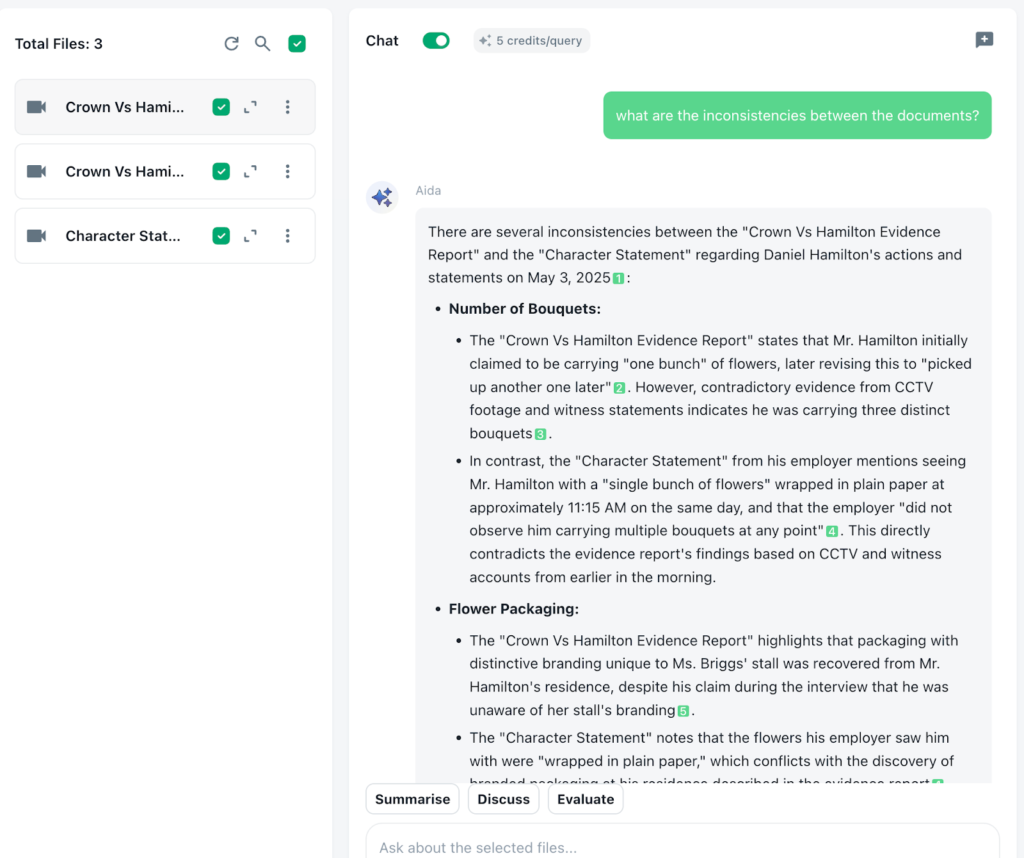
In Beings, all analysis stays within the material provided, with outputs linked back to the exact passages they are drawn from. This allows legal teams to move between summary and source without losing context, and to check interpretations against the original wording when needed.
On-premise AI for sensitive legal data
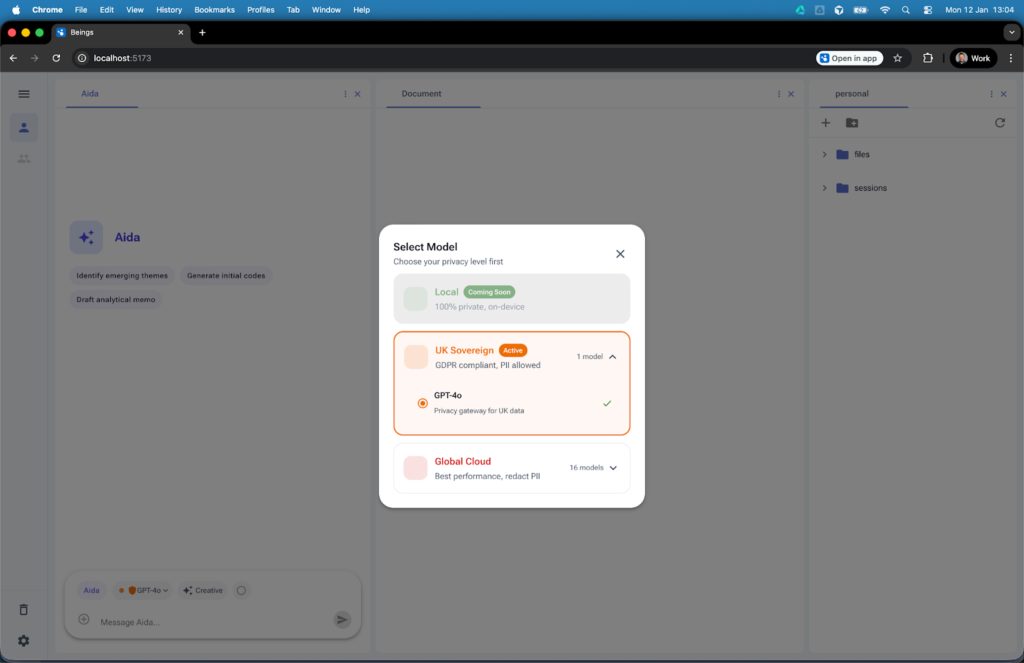
Beings offers an “Off Cloud” solution where none of the uploaded material or AI analysis passes through the Cloud. This air-gap solution is one of the only ways AI can be used in certain sensitive legal cases, and ensures that information is not processed, or sent, outside of the user’s own desktop. Where teams don’t need such a strict level of control, there is also the option to choose which model is used, to determine which jurisdiction it falls over. Again, providing traceability of data and security that can be shared with clients.
Built for large datasets, not just one loaded document
Instead of breaking documents into smaller parts or managing multiple sessions, Beings allows teams to work across full case files, including contracts, transcripts and supporting evidence, within a single project space.
Compare across files, not just within them
Analysis can extend across documents, making it easier to identify differences in wording, repeated themes or inconsistencies that only become visible when material is reviewed together rather than in isolation.
How legal teams can use AI securely, responsibly and transparently
For legal teams transitioning to ongoing AI usage in legal workflows, the focus is on introducing it in a way that maintains control over both process and output, rather than handing over responsibility.
Beings supports this by allowing teams to work with AI while keeping full visibility over their data, their workflow and the source material behind every output. See how Beings supports secure legal AI workflows by trying it for free.