In today’s AI-native world, extracting data from documents is perhaps one of the easiest, and most versatile use cases. From uploading transcripts and running focus group analysis, to analysing legal contracts, AI models help to extract, analyse and synthesise data from documents easily.
However, while extracting data using AI sounds like one job in practice, it’s three. Pulling fixed fields from an invoice, synthesising themes across fifty research papers, and asking questions of a document set are all different tasks.
According to the AIIM Market Momentum Index 2025, 78% of enterprises now use some form of AI to process documents, but data security remains the top concern. Picking the right tool matters, and the choice depends on what you’re extracting and how sensitive the source material is.
What does extracting data from documents actually mean?
Before selecting an AI tool to extract data, it helps to separate the three tasks for which it is most useful.
Structured data extraction using AI
Structured extraction pulls named fields from documents with a consistent layout. Think invoices, totals, contract dates, or fields that are on a standardised claims form. The output is typically a row in a spreadsheet, and traditional OCR and form-parsing tools are built for this task.
Unstructured data extraction using AI
In unstructured extraction, the data is messier with no predictable fields. This is typically when you would be working through a long document, interview transcripts, or a collection of case files, looking for themes, quotes and other evidence. Layouts can vary, and the insights that you would be looking for are not sitting in a fixed cell. This is where general LLMs and qualitative research platforms are most useful
Using AI to answer questions across a document set
The third task is conversational. You want to ask a question and get an answer grounded in a specific body of documents or knowledge. “What did respondents say about pricing?” or “Which contracts include a non-compete?” The AI tool used here needs to retrieve the correct passages and synthesise an answer, ideally pointing directly back to the exact source.
General-purpose AI models for extracting data using AI
Threads on Reddit and elsewhere tend to circle the same three names when people ask about document analysis. Each has its trade-offs worth knowing.
ChatGPT
ChatGPT is widely used, heavily documented and often the easiest place to start. It can accept PDF uploads, handles reasonably long documents and has a large library of custom GPTs that someone may have already built for your particular use case.
Where it struggles is that longer documents can get truncated or summarised rather than fully read, outputs aren’t always traceable back to source passages, and the model is known for generating confident-sounding information that isn’t in the original documents that you uploaded.
Claude
Claude, while not as popular as ChatGPT, is known for being strong on long-context work. Claude has historically handled longer documents in a single pass than most alternatives, which matters when you are working with lengthy reports or contracts.
It does appear that Claude is more cautious than its competitors, with clearer signals when it’s uncertain and general chatter seems to suggest that it is preferred for analysis tasks when reasoning quality matters more than the breadth of integrations. The same caveats of traceability still apply, as with ChatGPT: you’re trusting the model’s summary and not a direct link back to the paragraph it came from.
Gemini
Gemini is often easy for many to reach for as it is fully integrated within Google Workspace. Its convenience when working with Docs, Sheets and Drive makes it a popular choice for extracting data. It can pull context from connected files and handles multimodal inputs well.
The trade-off with Gemini is similar to both Claude and ChatGPT; however, it’s useful for quick synthesis, but less suited to work where you need to defend every claim back to a specific passage. In particular, when working with Google Drive, unless you have a fairly organised system of storage, it can be hard to trace where a given piece of information actually came from. Gemini also runs the risk of pulling context from other documents in the Drive that you didn’t intend it to use.
| Tool | Best for | Strengths | Key limitations |
| ChatGPT | Getting started quickly | Widely documented, accepts PDF uploads, large library of custom GPTs | Long documents can be truncated, outputs not traceable to source, prone to confident-sounding hallucinations. |
| Claude | Long-form document analysis | Handles lengthy documents in a single pass, more cautious and signals uncertainty clearly | No direct traceability back to source passages. |
| Gemini | Google Workspace users | Pulls context from connected Drive files, handles multimodal inputs | Risk of pulling unintended documents from Drive, hard to trace where information came from. |
Where general LLMs fall short when extracting data from documents
All three of these share the same underlying limitation for serious document work. They’re optimised for fluent synthesis, not for ground-truth retrieval. That’s fine when you’re drafting, brainstorming or asking exploratory questions. It’s a problem when you need to know that a specific claim came from a specific document, or when a hallucinated fact can cause real damage.
For regulated work, sensitive data, or evidence-based analysis, general LLMs are usually a starting point rather than the finished solution.
OCR and document parsing tools
If what you actually need is to get text and structured data out of scanned or image-based documents, OCR (optical character recognition) tools are the right category. They read the document and convert it into machine-readable text or structured fields.
When OCR is the right fit
OCR earns its place when your documents are scanned PDFs, photos of forms or images that an AI model can’t read as text directly. It’s also the right choice for high-volume, repetitive documents. Things like invoices, receipts or a form where the same field needs pulling every time.
Modern LLMs can now read text from images and scanned PDFs, too, which has blurred the line a little. They are fine for one-off reads of clean documents, but for high-volume work or messier source material, having a dedicated OCR is still more reliable and cheaper at scale.
Common options (Adobe, ABBYY, AWS Textract, Google Document AI)
For general use, Adobe Acrobat has OCR built in and handles most everyday jobs. ABBYY FineReader goes deeper and is widely used by teams working with more demanding documents or higher volumes. For anything that needs to plug into your own workflow, AWS Textract and Google Document AI offer cloud-based APIs with support for forms and tables as well as plain text.
Limits of OCR for research and analysis
OCR converts documents into text, but it doesn’t interpret them. If you need to find themes across fifty interview transcripts, or compare how different policy documents treat the same issue, OCR gets you the data into the system but no further. It should be used as a foundational layer rather than the analysis layer.
Qualitative research platforms: where Beings fits
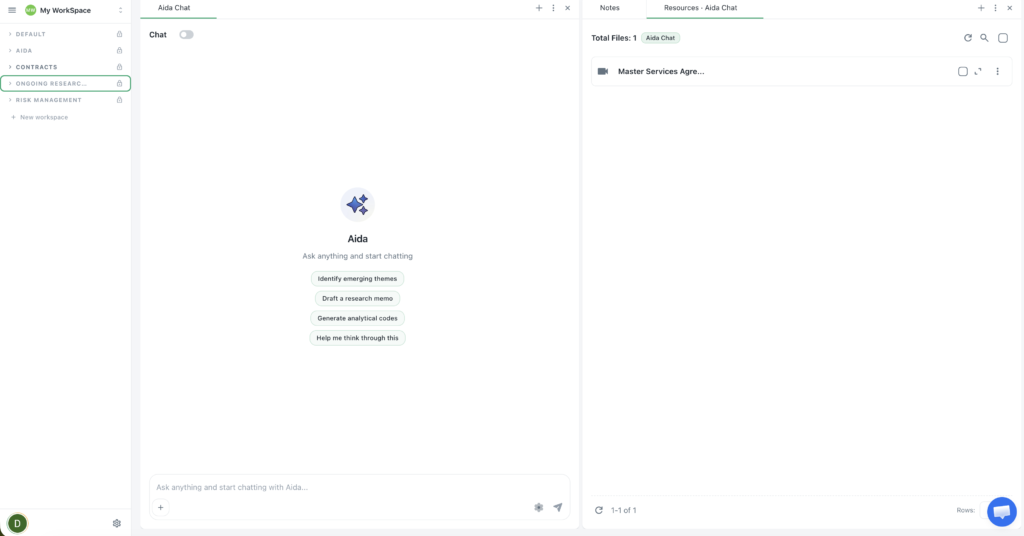
For unstructured extraction and question-answering across document sets, particularly when the work involves sensitive information or needs to stand up to scrutiny, a dedicated platform handles the job that LLMs and OCR tools weren’t built for.
Beings is a tool for extracting data from documents, with Aida; an AI co-partner for analysis work.
Multi-document analysis with ground-truth processing
Beings is built to analyse across multiple documents at once, with Aida surfacing themes and answers grounded in the source material, rather than generated from general knowledge. The Ground Truth principle, means every output traces back to what’s actually in the documents, without filling in gaps with plausible-sounding content. If the evidence isn’t there, Aida says so. This is a different operating model from general LLMs, and it’s the right approach when accuracy matters more than fluency in document review.
Direct citation traceability
Every claim Aida makes is linked back to the specific passage it came from as a clickable link. You are able to see the source, which means that analysis can be checked and reused. For researchers, legal teams, finance companies, and anybody whose outputs get reviewed, this traceability is the difference between a tool you can rely on and a tool you need to re-verify by hand.
Who Beings is built for
Beings works best for teams handling substantial or sensitive documentation. Research agencies, in-house legal, finance teams working on risk and compliance, and academics doing evidence-based work.
Data is processed in the UK, which matters for teams working under GDPR or handling regulated material. Pricing is flat-rate across a team, so the cost doesn’t balloon as more people start using it. Aida is positioned as a co-partner alongside human interpretation, not a replacement for it.
How to choose the right tool for extracting data
When choosing the right tool, the best way to approach it is to work backwards. Start with the output you require, the documents you have, and the right tool usually becomes clear.
Here is a framework to use when assessing.
1. Match the tool to the document type
Scanned or image-based documents need OCR as a first step, regardless of what you do next. Text-based PDFs and transcripts can go straight to an AI model or a research platform, particularly for work like AI-assisted literature reviews where the source material is already digital. If you’ve got a mix, you’ll usually need OCR feeding into analysis software.
2. Match the tool to your data sensitivity
If your documents contain personal data or commercially sensitive material, the way the tool processes your data matters as much as what it can do with it.
Check where the data is processed, how long it’s retained, and who inside your team can access what, before anything gets uploaded.
For teams handling this kind of work regularly, GDPR-compliant tools built with security at their core are worth more than platforms that treat it as an enterprise add-on.
Start extracting data from documents with Beings
If your work involves analysing substantial or sensitive documentation, pulling out evidence, themes, or answers you can defend back to the source, Beings is built for that job.
Aida works alongside your team as an AI co-partner, grounded in your actual documents, with every output traceable back to the passage it came from. Try it for yourself today.